Showing posts with label Controller. Show all posts

Saturday, 16 December 2017

Surface Pro 4 Gaming Controller - Mark 2

Last year I retrofitted a Lynx Vision controller onto my Surface Pro 4.

Here's the step by step guide:

It's been wonderful to game on.


Above is the one I made last December.

This year I decide to make an updated version. Surface Pro 4 gaming controller Mark 2!
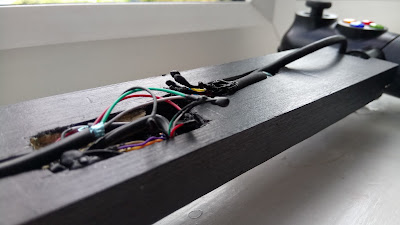
With extra USB ports at the back. I spent a weekend carefully whittling to hollow out the bit of wood in order to house the USB ports and reattached the gaming controller to this. There was much more fiddly rewiring to do than the first version.
Other minor changes was to make it a few centimetres narrower so that it would fit better in my backpack, keeping all the wiring (aside from the main one that connects to the Surface Pro 4) inside the wood whereas last time I just covered it with tape, and using magnets at the base of the back plate to keep it secure when it is folded down to the Surface Pro 4 whereas before I had used velcro.

Below is the current version.


A couple of versions thst went wrong as I was trying to figure out the wiring through trial and error. 


Friday, 2 December 2016

Retrofitting a gaming controller from a Linx Vision onto my Surface Pro 4

The finished thing! A gaming controller mounted onto my computer. :D


STEP 1
I bought a faulty Linx Vision from ebay. I thought the controller design was fantastic and wanted it on my Surface Pro 4. The Linx Vision was much smaller than my Surface Pro so I had to build a custom mount.


STEP 2
I took all the screws out to disassemble the whole thing.


STEP 3
Cutting the wires and attaching a USB cable to it instead. All the wires are colour coded so connecting a USB was very straight forward.


Moment of truth! Plugging in the USB. All the buttons lit up. :) Windows 10 reconised it as an xbox controller. Perfect. :)


Fired up Alice Madness Returns to test the controller. Everything works fine. I was very happy at this point.


STEP 4
Building the mount. A bit of wood I cut to 12.5 inches. I then cut and carved the ends to fit the control pads.


I used black acrylic paint. Applied with a sponge to get a smooth finish.


 Once the paint was dry I started screwing everything in.


I then carved a channel to tuck the wires into the wood. Applied some masking tape and painted over it again with black paint. 


STEP 5
Attaching the controller mount onto the backplate stand of my Surface Pro hard case. You can see the wire slightly pushing up the tape. But that's fine, not a big deal.


All attached. When folded back, the controller also works as a stand. Ta da!

Before.
Without the gaming controller case attached.


After.
WITH the gaming controller case attached. :D
Since the controller is only attached to the case I can still easily take it out the Surface Pro 4 which is handy.